如何安装
两分钟,四步。如果插件在游戏中没有显示,最后一部分涵盖了所有我们见过的原因。
一键搞定:GearInsight 更新器
一个 Windows 小工具:自动找到魔兽世界目录,装好 GearInsight,之后在后台自动保持最新。新版本发布几分钟内就会更新到你电脑上,每次打开游戏也会再检查一次。不用解压,不用找文件夹。
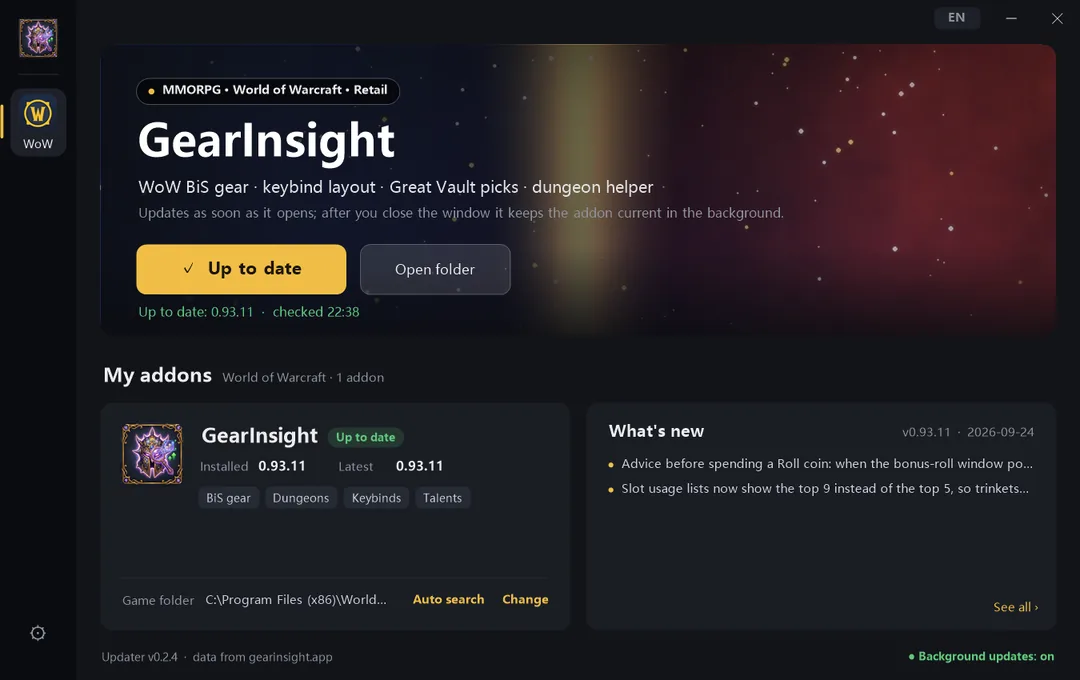
- 下载后双击 GearInsightUpdater.exe。不用安装,也不用管理员权限。
- If downloading or running the updater is blocked, use the ZIP below. An unsigned app may trigger a warning; a download warning and a Windows launch warning are different. Do not disable your security software.
- Select the game and enable its addon in the updater. Set its game folder once; new versions are then checked and installed automatically.
- 关掉窗口即可 —— 它会待在右下角托盘里自动更新。更新时游戏正开着的话,输入 /reload 生效。
只动 GearInsight* 这几个文件夹,旧版本会备份到 Interface\GearInsightBackup。界面语言跟随 Windows(中文 / 英文),右上角按钮可以切换。仅支持 Windows;macOS 请按下面的手动步骤安装。
或者手动安装:
1
2
找到你的AddOns文件夹
Windows — 如果你把游戏安装在其他地方,只有World of Warcraft前面的部分会不同:
C:\Program Files (x86)\World of Warcraft\_cn_beta_\Interface\AddOns
macOS:
/Applications/World of Warcraft/_cn_beta_/Interface/AddOns
In Battle.net, select the game you actually play and choose Show in Explorer. Open that client's Interface/AddOns folder.
CN Beta: _cn_beta_\Interface\AddOns
Global Beta: _classic_beta_\Interface\AddOns
3
Extract every addon folder from the ZIP directly into AddOns. Do not leave them inside an extra ZIP-named folder.
AddOns/GearInsight_Forever/GearInsight_Forever.toc
4
重启游戏并检查
如果游戏正在运行,请完全退出并重新启动——对于新添加的插件,/reload是不够的。然后在聊天中输入/gi,面板应该打开。
没有显示?
Check the selected game, the AddOns folder and the addon checkbox on the character screen. Fully exit and restart after adding folders. Settings in WTF are preserved when updating.
Use the downloads for the game selected above. CurseForge may show a release later while it is being reviewed. In addon managers, select the CurseForge source.